The cat breeder app – litters, buyers and kittens in one place

The complete app for cat breeders and cat owners.

QR code that opens CatCompanion in the App Store
Scan with your phone's camera

The code opens CatCompanion in the App Store on your phone.

Free to download for iPhone and Android.

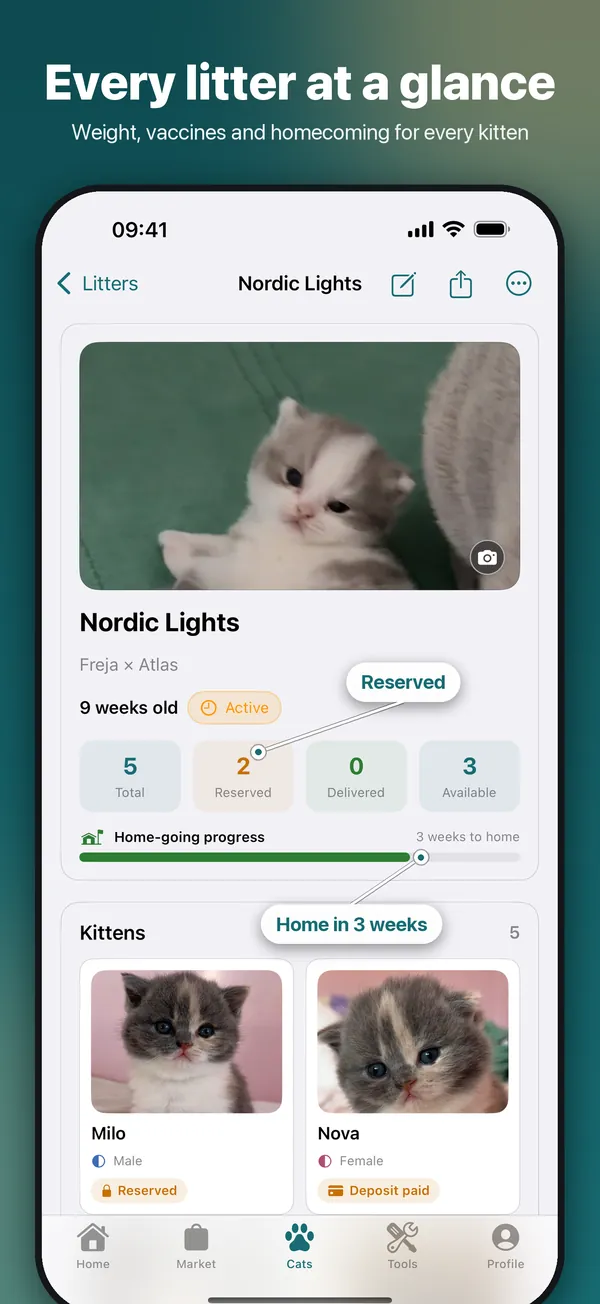
CatCompanion litter view: the litter Nordic Lights with kitten photos, reserved and available kittens and weeks until homecoming

Right now on CatCompanion: 28 kittens available · 8 catteries · 6 countries

How to get started

  1. Download the app for free

    Free on the App Store – no card and no account needed to start.

  2. Choose what you do

    Breeder, cat owner or looking for a kitten – the app sets itself up for you. Breeders get every tool open for 7 days.

  3. Add your first cat

    Your cat is in the app within a minute – then reminders, weight curve and journal take care of themselves.

Kittens looking for a home right now

See all available kittens →

See what you can do with CatCompanion

Real screenshots from the app and the exact steps to get going. Pick what fits you:

All how-to guides →

For cat breeders

From mating to moving day: run your whole cattery from your phone.

CatCompanion litter view: the litter Nordic Lights with kitten photos, reserved and available kittens and weeks until homecoming
Cat Breeder Premium

Litters and kittens, step by step

Register the litter once and every kitten gets its own profile — weights, reservations and the moving card all follow from there. Heat and mating dates give you the expected birth window.

Step by step

  1. Open Cats → Litters and tap + (Add litter), or open the mother → ⋯ → Add litter.
  2. Choose the parents and the mating or birth date, and save.
  3. Open the litter and add the kittens with Add Kitten, or log them one by one as they are born in Birth log.
See the full guide →
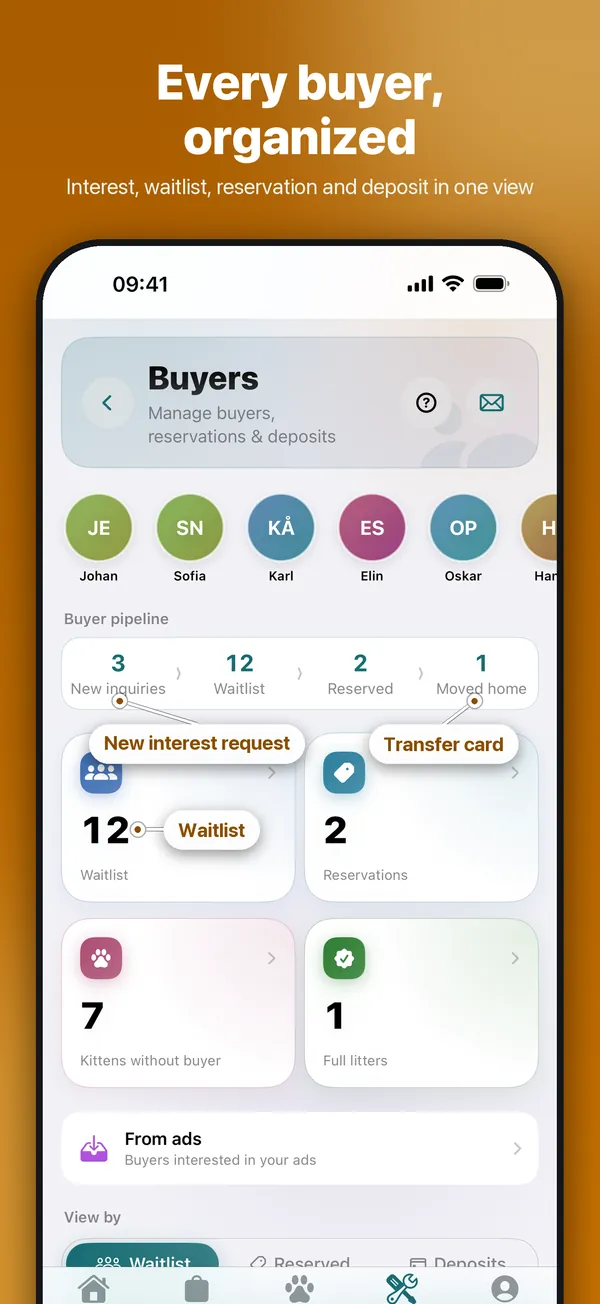
CatCompanion buyer hub: buyer pipeline with new interest requests, waitlist, reservations and moved-home kittens
Cat Breeder Premium

Waitlist, interest requests and deposits

Everyone who wants a kitten in one list. Requests from your cattery website land in an inbox, you reserve a kitten in one tap, and deposits are booked in your finances automatically.

Step by step

  1. Open Tools → Cattery & sales → Buyers, or Waitlist on Cats.
  2. On Waitlist, tap + (Add Buyer) and fill in the buyer and their wishes.
  3. When a kitten is promised, open the entry and tap Reserve a kitten. The buyer moves to Reserved.
See the full guide →
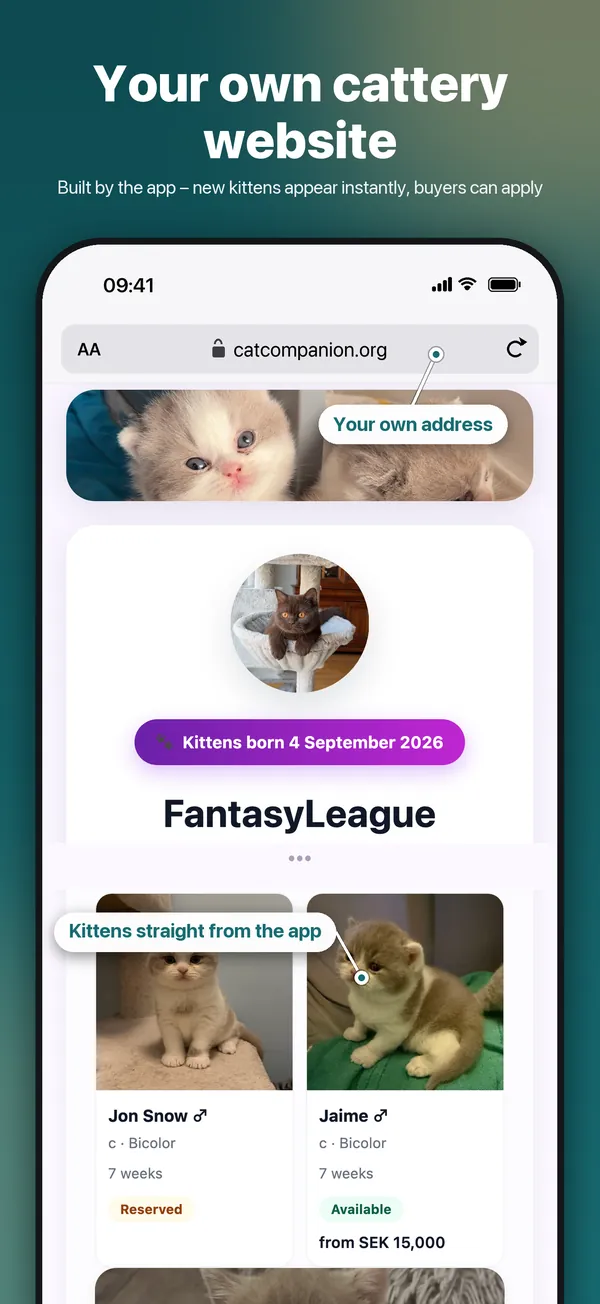
A cattery website on catcompanion.org opened on a phone, with kittens shown straight from the app
Cat Breeder Premium

Your own cattery website, built by the app

Your cats, litters and kittens show up on your own page at catcompanion.org as soon as you add them in the app. Buyers send interest requests straight from the page.

Step by step

  1. Open Cats → My cattery website, or Tools → Cattery & sales → My cattery website.
  2. Work through Build your page and tap Edit website content to write your texts.
  3. Tap Share link to send the page to buyers.
See the full guide →
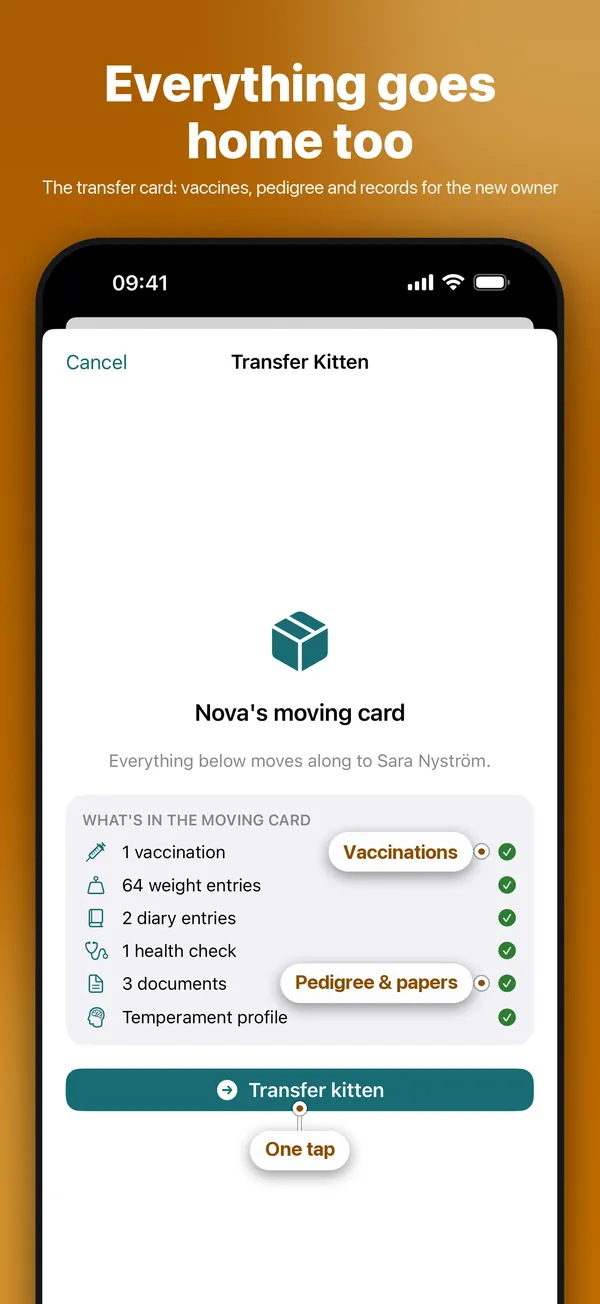
CatCompanion moving card for the kitten Nova: vaccinations, weight entries, diary, health check, documents and temperament profile follow along
Cat Breeder Premium

The moving card: everything follows the kitten home

On moving day, one tap sends the kitten's vaccinations, weights, documents and diary to the new owner, who accepts it in their own app.

Step by step

  1. Open Cats → Kittens and open the kitten.
  2. The kitten needs an active reservation with a buyer. Add one first if it's missing.
  3. Tap Transfer Kitten and confirm.
See the full guide →
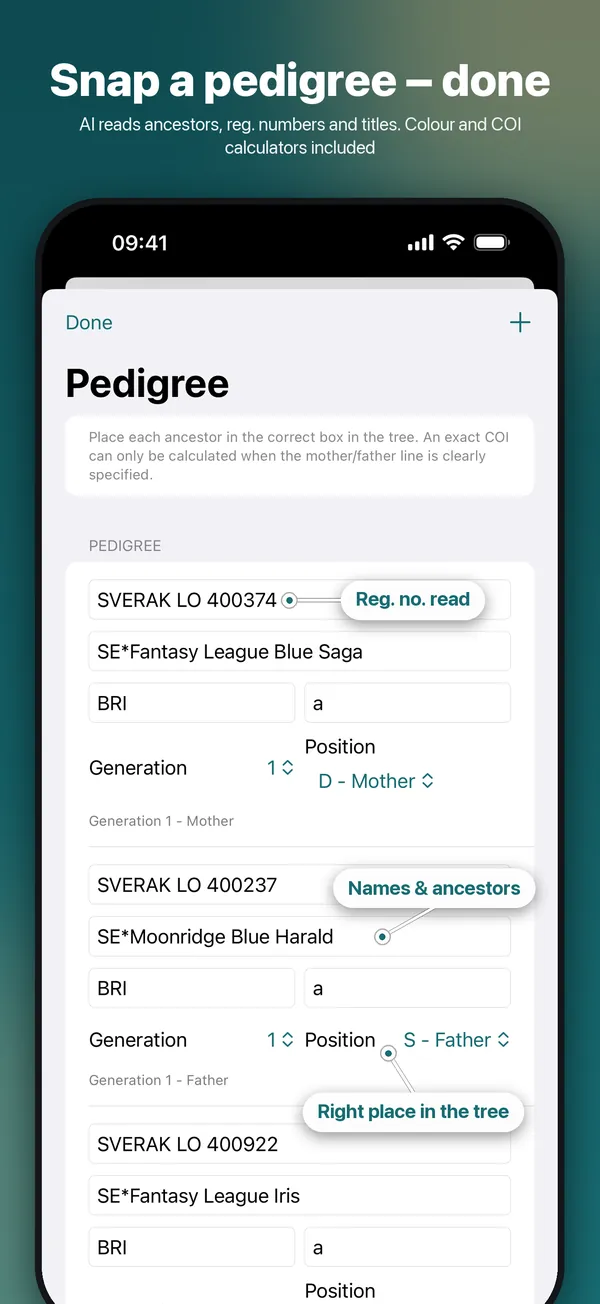
CatCompanion pedigree scanner: scanned ancestors with registration numbers placed in the right position of the family tree
Cat Owner Premium

Scan a pedigree in seconds

Photograph a paper pedigree, or pick a PDF, and the AI places every ancestor in the right spot of the tree — ready for the colour and inbreeding calculators.

Step by step

  1. For one of your cats or kittens: open it → Scan papers → Pedigree.
  2. To read any pedigree: Tools → Scanners → Pedigree Scanner.
  3. Tap Scan document, or choose photos or a PDF — several pages are read together as one pedigree.
See the full guide →

For cat owners

Everything about your cat in one place — with reminders, so nothing is missed.

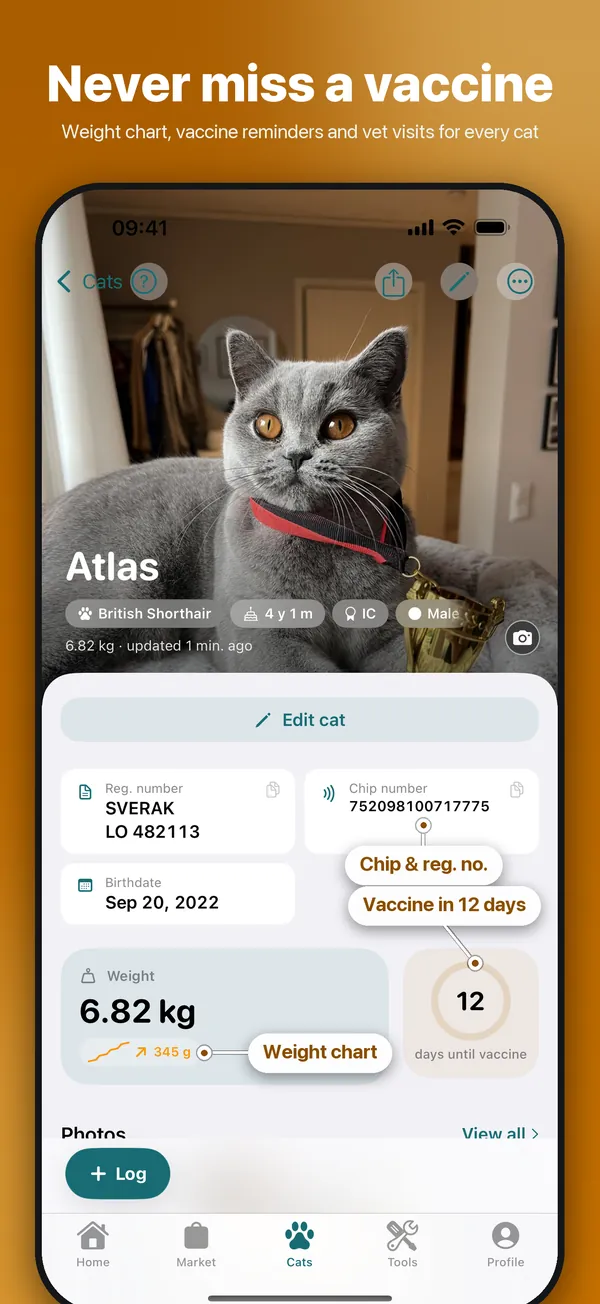
Cat profile in CatCompanion: British Shorthair Atlas with registration and chip number, next vaccination and weight curve
Free

Start your cat's journal in a minute

Name, sex and date of birth is all it takes. Then add photos, vaccinations, weights and papers — the AI reads your documents for you.

Step by step

  1. Open Cats and tap Add Cat.
  2. Fill in name, sex and date of birth. Everything else can wait.
  3. Save. Open the cat to add a photo, vaccinations and weights.
See the full guide →
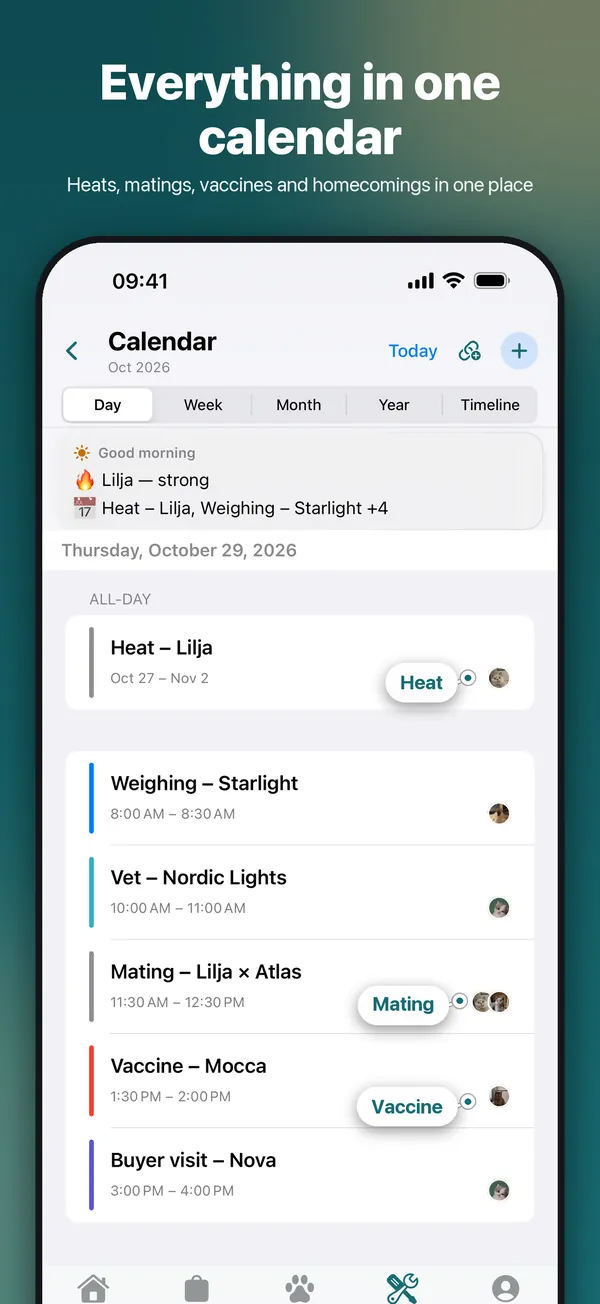
CatCompanion calendar with heat, weighing, vet visit, mating and vaccination for the day
Free

Calendar and vaccination reminders

Vaccinations, matings, births and vet visits in one calendar. Scan the vaccination card and the next doses fill themselves in, with reminders.

Step by step

  1. Open Tools → Health & everyday → Calendar.
  2. Tap + to add an event, choose the type and the cat, and set a reminder.
  3. From a cat's profile, ⋯ → Add to calendar opens the same form with the cat already chosen.
See the full guide →
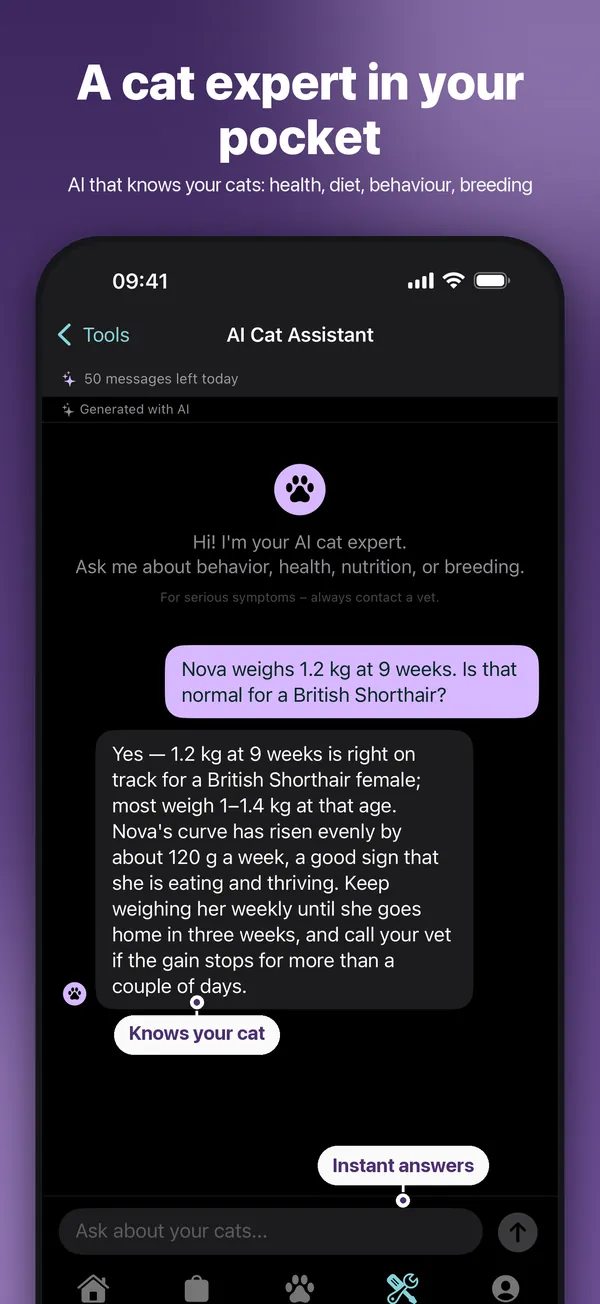
CatCompanion AI cat assistant answering whether a 9-week-old British Shorthair kitten's weight is normal
Free

An AI cat expert in your pocket

Ask about health, behaviour, feeding or breeding any time of day. The AI knows your cats, so the answers fit your cat.

Step by step

  1. Open Tools and tap the big card at the top, Ask CatCompanion AI.
  2. Write your question as you would to a friend, with the cat's age and breed.
  3. Ask follow-up questions in the same conversation.
See the full guide →

Looking for a kitten?

Browse kittens and cats from breeders in the app's Market and on the breeder map. It's free, and you don't need an account to look around.

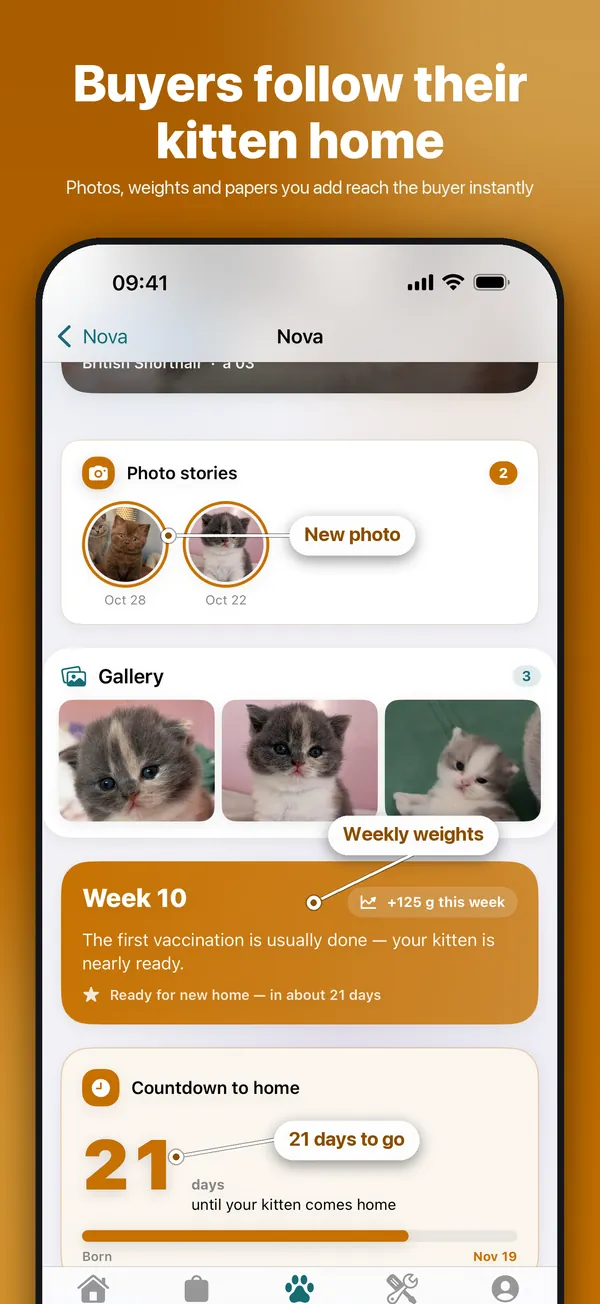
Buyer view in CatCompanion: photo stories, gallery, week 10 weight update and countdown to the kitten's homecoming
Free for buyers

Follow your kitten all the way home

When your breeder uses CatCompanion, you see your kitten's photos, weekly weights, documents and payments in the app — and on moving day its whole history becomes yours.

Step by step

  1. Open Market → Purchases.
  2. Open your kitten to see weights, photos, documents and what has been paid.
  3. On moving day, accept the moving card on Cats. Then the kitten becomes yours in the app.
See the full guide →

Start your search

Free or paid?

CatCompanion is free to download, and the free Basic plan stays free:

Up to 2 cats · 2 AI chats/day · Feed · Breeder map · Calendar · Cat registry

Which plan should I choose?

Do you breed kittens, even just now and then? Choose Cat Breeder Premium. Have cats but don't breed? Choose Cat Owner Premium.

Cat Owner Premium

For you if you have cats but don't breed kittens. Weight charts, finances, pedigree scanner, annual report, colour calculator and articles.

Cat Breeder Premium

For you if you breed kittens — even the occasional litter. Everything in Cat Owner Premium plus the buyer portal, litter and stud ads, breeding and inbreeding calculators and breeding planning.

All breeder tools are open for 7 days — no payment, no account needed. Premium plans start with a free trial in the App Store, and you can cancel any time.

Questions and answers

Is CatCompanion free?

Yes. The app is free to download, and the free Basic plan covers up to two cats with health journal, vaccinations, diary, calendar, the marketplace and two AI questions a day. Cat Owner Premium and Cat Breeder Premium add more tools.

Can I try the breeder tools before I pay?

Yes. Choose that you breed cats when you start the app, and all breeder tools are open for 7 days — no payment and no account needed. Premium plans then start with a free trial in the App Store.

Is there an Android app?

Yes. CatCompanion is on the App Store and on Google Play, and your account works on both.

Who can see my cats and my data?

Your journal, finances and buyer lists are private. Only what you choose to publish — your cattery website, ads or a public cat profile — is shown to others, and health data on a public profile is only shown if you turn it on.

Can I get my data out of the app?

Yes. Export your cats, weights, vaccinations and books as CSV files for Excel, Numbers or Google Sheets, or take a full backup whenever you like.

Which languages does the app speak?

CatCompanion is available in 13 languages: English, Swedish, German, Spanish, French, Japanese, Polish, Turkish, Czech, Korean, Portuguese, Finnish and Norwegian.

Everything you need for your cats

Knowledge Library

When should you contact a vet urgently?

Learn which signs need fast action and when it is safer not to wait.

Litter box problems

Common reasons a cat avoids the litter box and what you can change at home.

How to reduce stress in your cat

Many behavior problems start with stress, uncertainty or too few safe resources.

All articles →  ·  Knowledge quizzes →

Breeders

Get CatCompanion

Free to download. Your cats, your cattery and your buyers — all in one app.

Download on the App Store Get it on Google Play